10 · APP TOUR

X6 AI 4D app in action

Real screenshots of version 2.4.119 — home, AI Scan with findings and 2D/3D/4D views, AI Chat, VOXEL, X6 GEO-SAT, AENIGMA and Token Store.

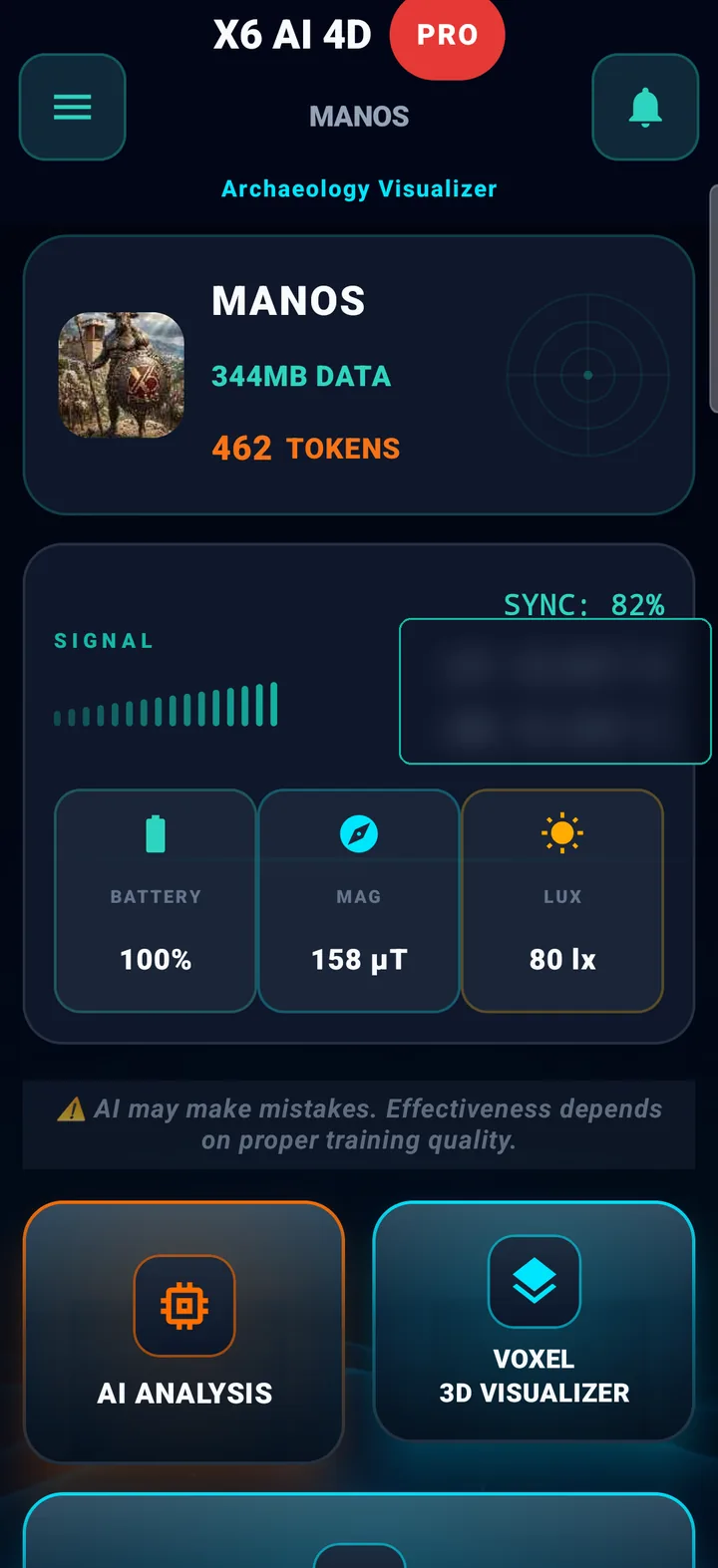
Home screen
01

Home screen

Your profile, available tokens and live phone sensors at a glance.

  • User profile with data and token balance.
  • Live readings: signal, GPS, battery, magnetometer (µT), light (lx).
  • A reminder that AI can make mistakes — transparency from the first screen.
DASHBOARD SENSORS TOKENS
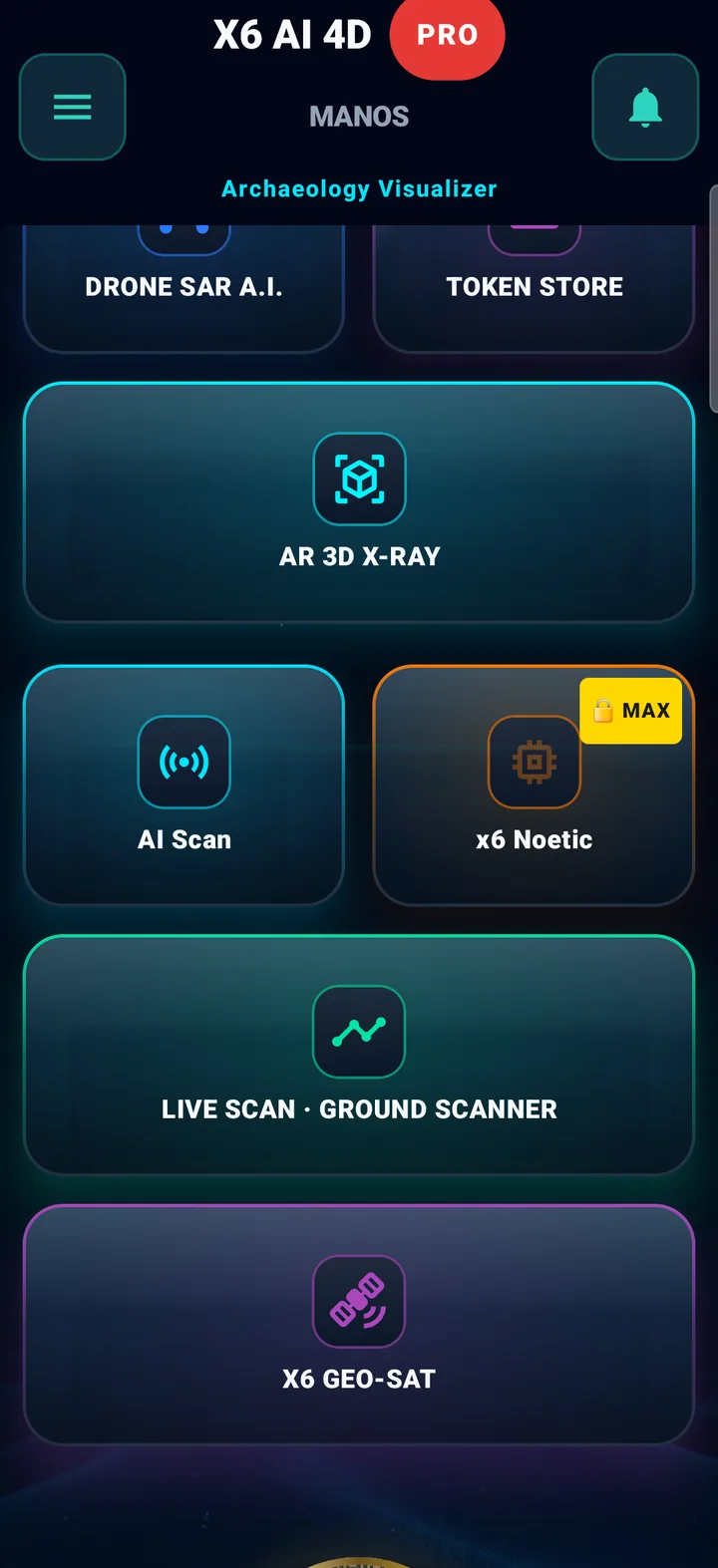
Every feature as a tile
02

Every feature as a tile

Every section of the app one tap away from the home screen.

  • AI Scan, AI Analysis, VOXEL, AR 3D X-RAY, X6 GEO-SAT, AENIGMA.
  • Live scan with the Ground Scanner, DRONE SAR A.I., Token Store.
  • Features of other plans are marked with a badge (e.g. MAX).
ALL MODULES AI SCAN GEO-SAT
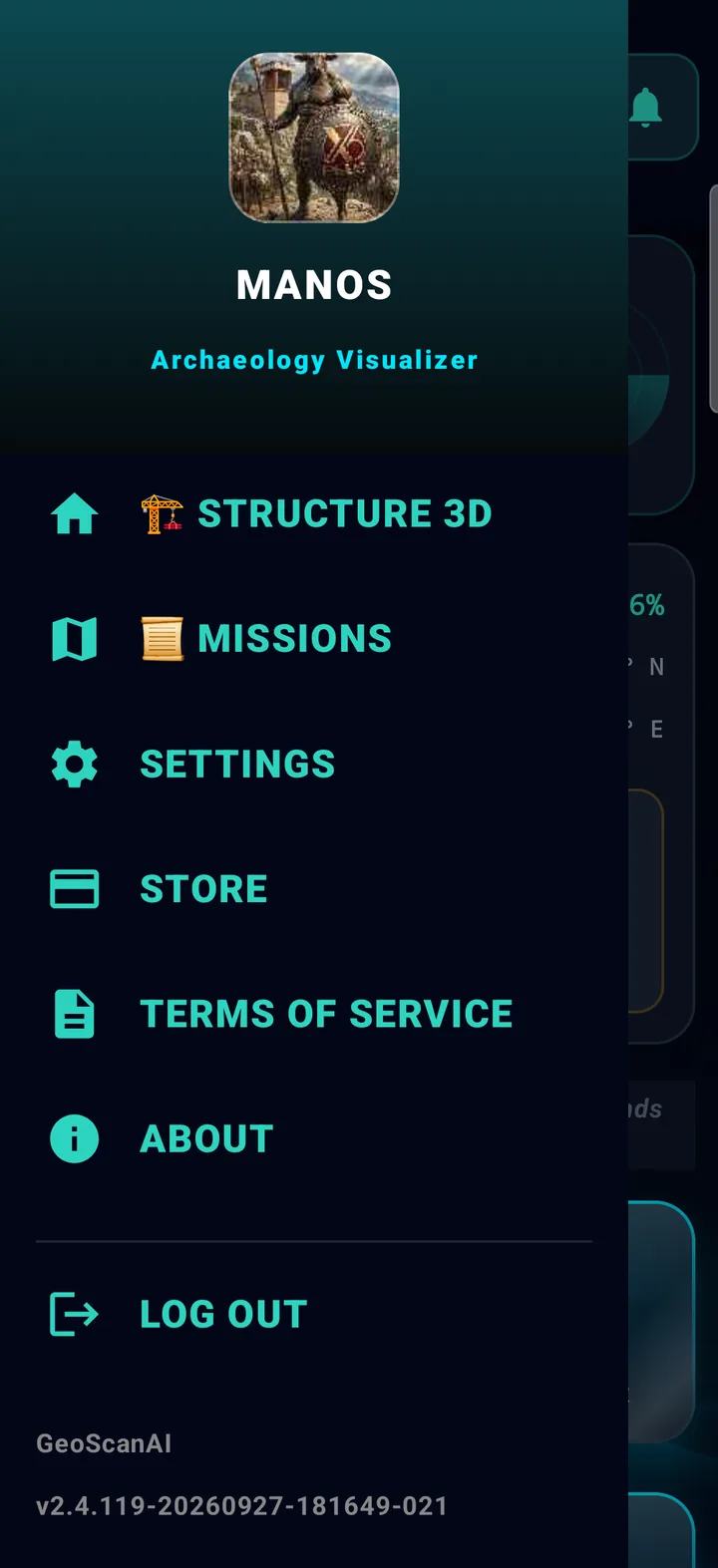
Side menu
03

Side menu

Quick access to account, scans and settings.

  • Profile, Invite & Earn, History, Surveys, GEO-SAT.
  • Structure 3D, Missions, Settings, Store.
  • The app version is always shown at the bottom.
MENU SETTINGS STORE
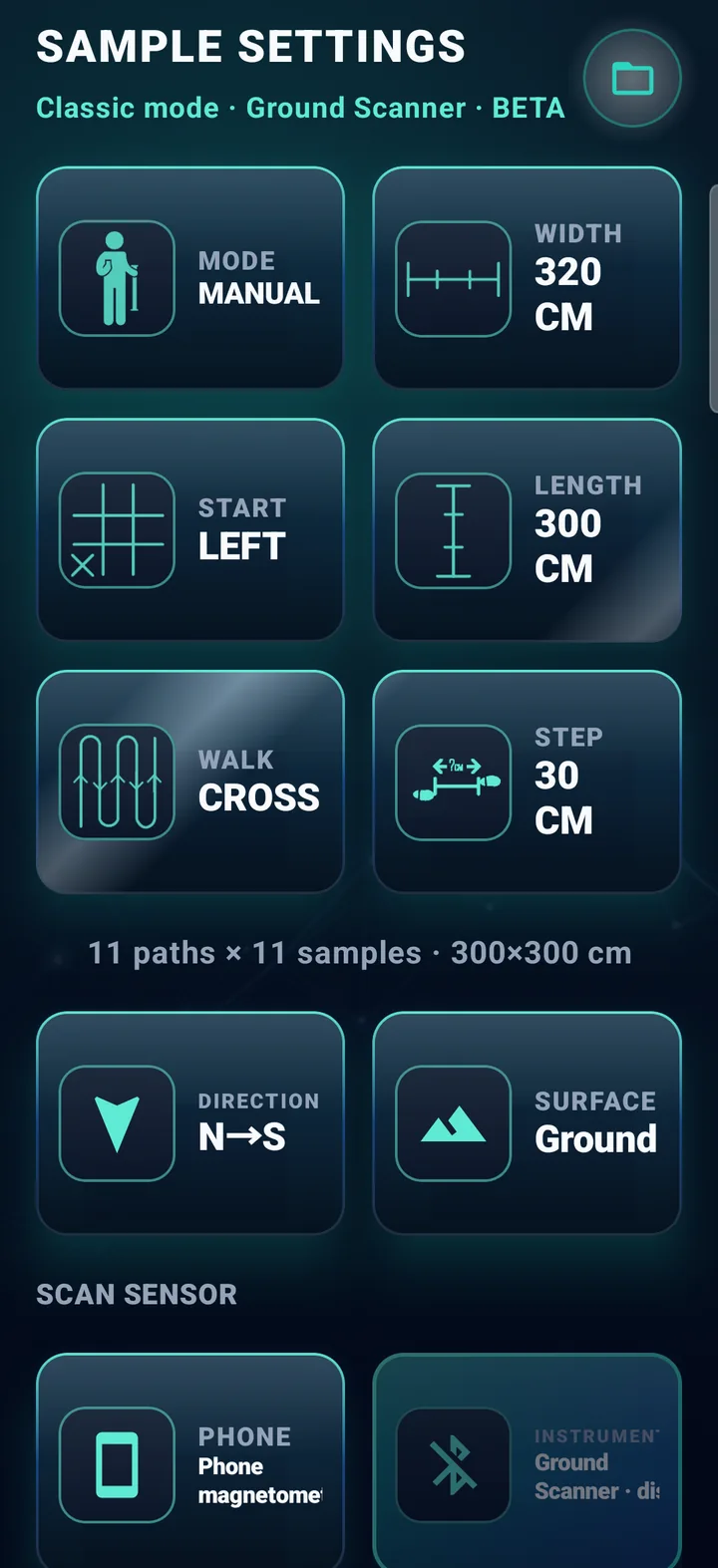
AI Scan — Sample settings
04

AI Scan — Sample settings

Define the grid just like in the field and start with the Ground Scanner.

  • Width, length and step in centimetres — the app works out lines × samples.
  • Manual or automatic · start left/right · parallel or cross walking.
  • Direction, surface (ground/slope/wall) and scan sensor.
AI SCAN GRID SETUP BETA
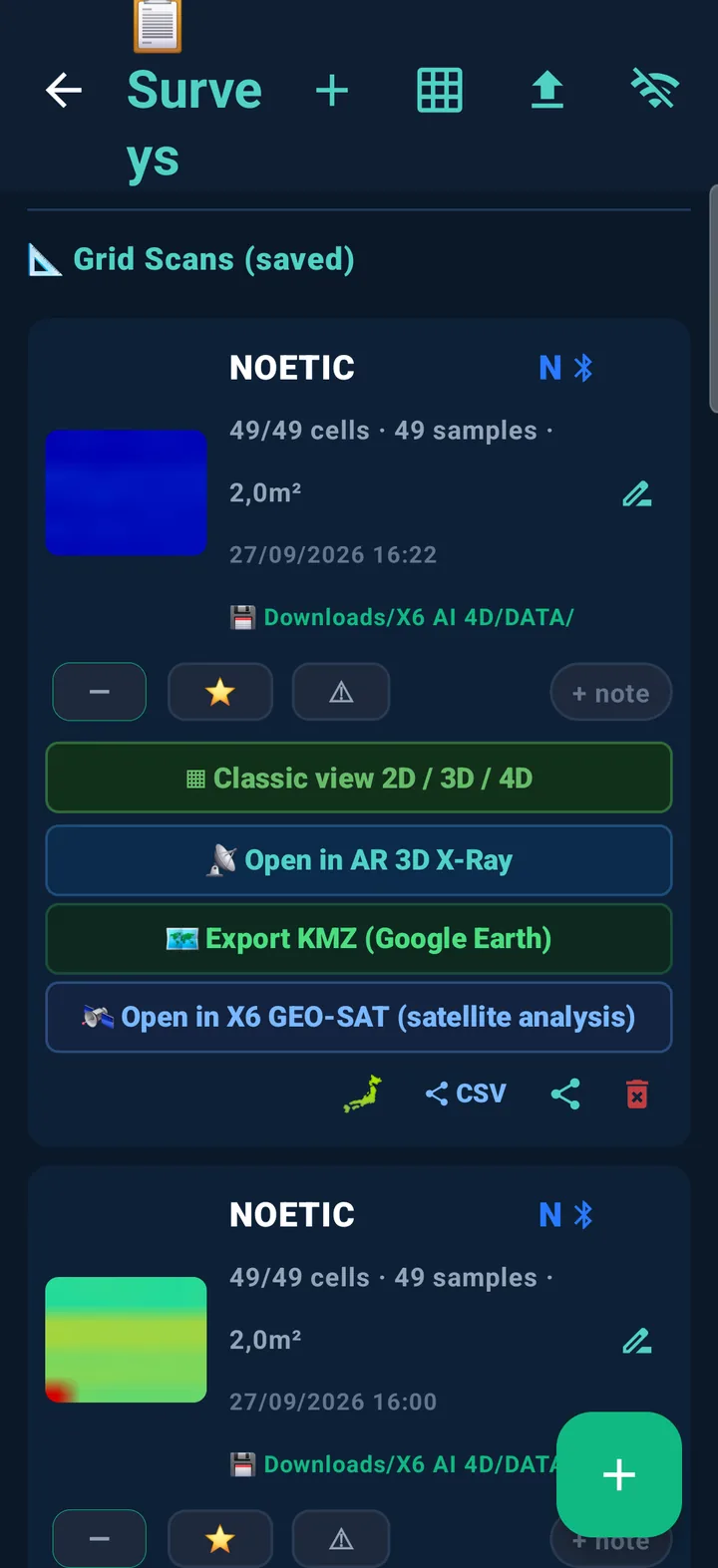
Scan list
05

Scan list

Every saved scan with a thumbnail, cells, area and date.

  • Classic 2D / 3D / 4D view — also for NOETIC console scans.
  • Open in AR 3D X-RAY or X6 GEO-SAT, export KMZ for Google Earth.
  • Star, note, share and CSV for every scan.
SCANS THUMBNAILS 2D · 3D · 4D
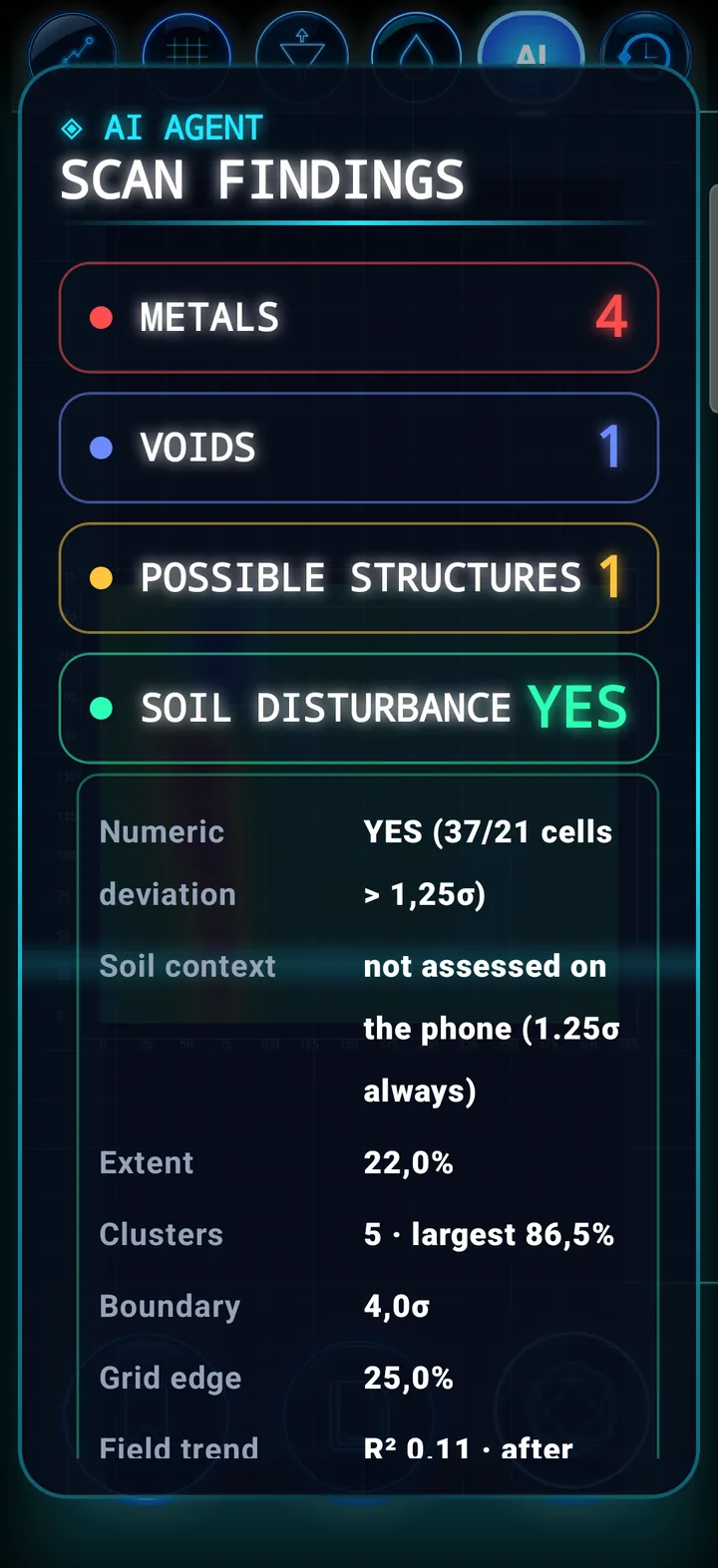
AI scan findings
06

AI scan findings

The on-phone automatic analysis counts metals, voids, possible structures and soil disturbance.

  • Four categories — nothing else.
  • Soil disturbance YES / MARGINAL / NO with numeric evidence.
  • Extent, clusters, boundary and a general ground-slope check.
AI AGENT 4 CATEGORIES YES · MARGINAL · NO
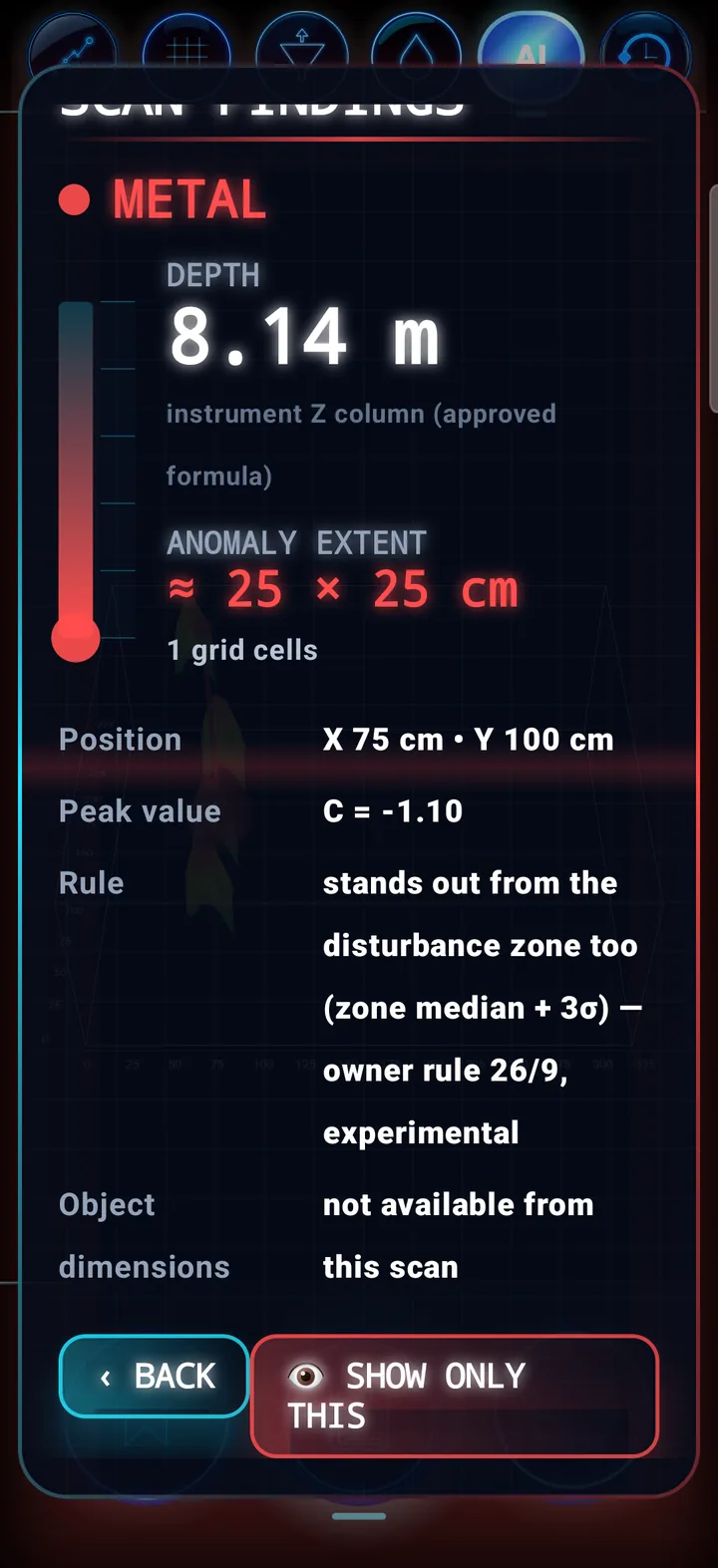
Finding card
07

Finding card

For every finding: depth with its source, anomaly extent, position, value and rule.

  • Depth from the instrument Z column (approved method).
  • Extent is the anomaly on the grid — not object size.
  • “Show only this” isolates the finding in the view.
METAL DEPTH RULE
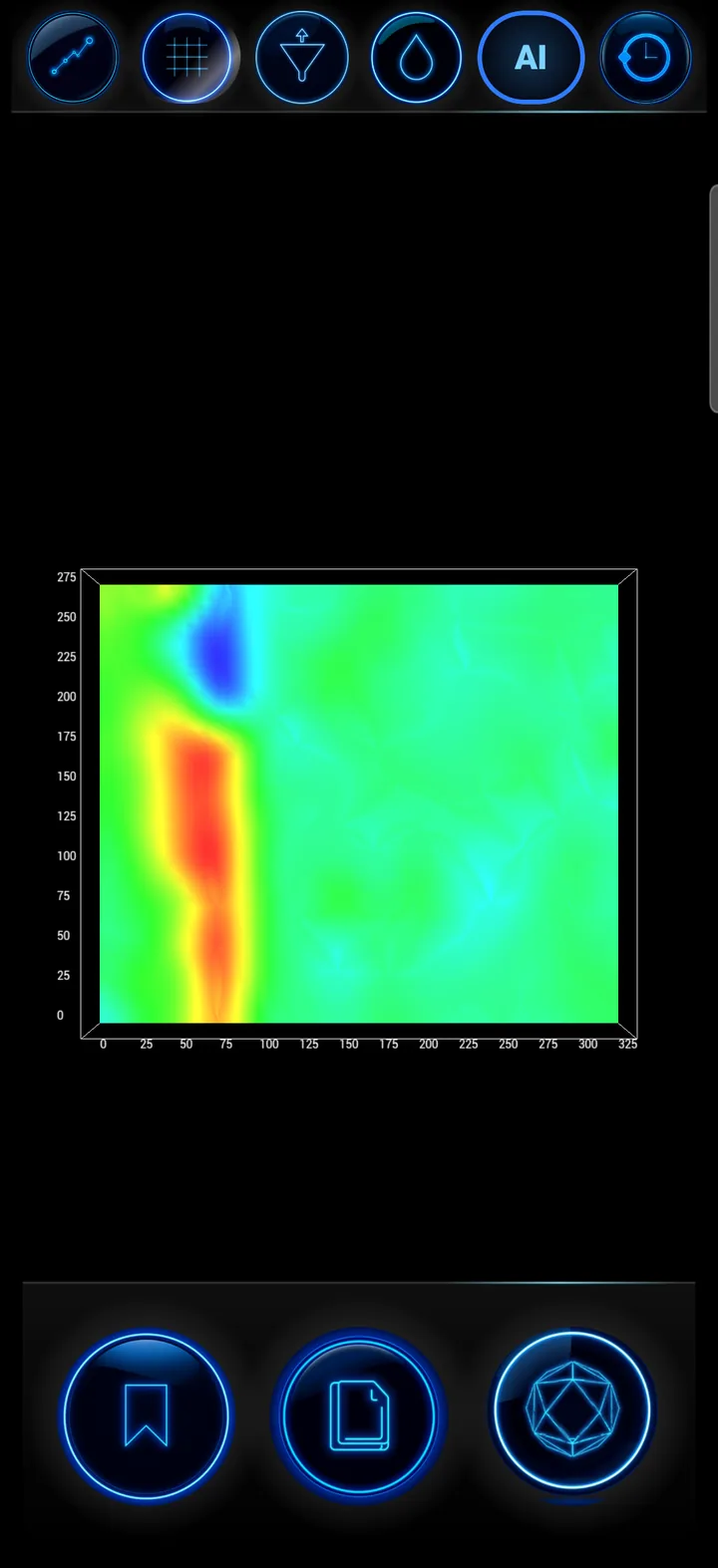
2D view
08

2D view

Heat map of the scan with interpolation, grid and axes in centimetres.

  • 2D interpolation, ISO contours and colour settings.
  • Switch 2D/3D and volumetric 4D with one tap.
  • Save CSV straight from the view.
2D HEATMAP ISO
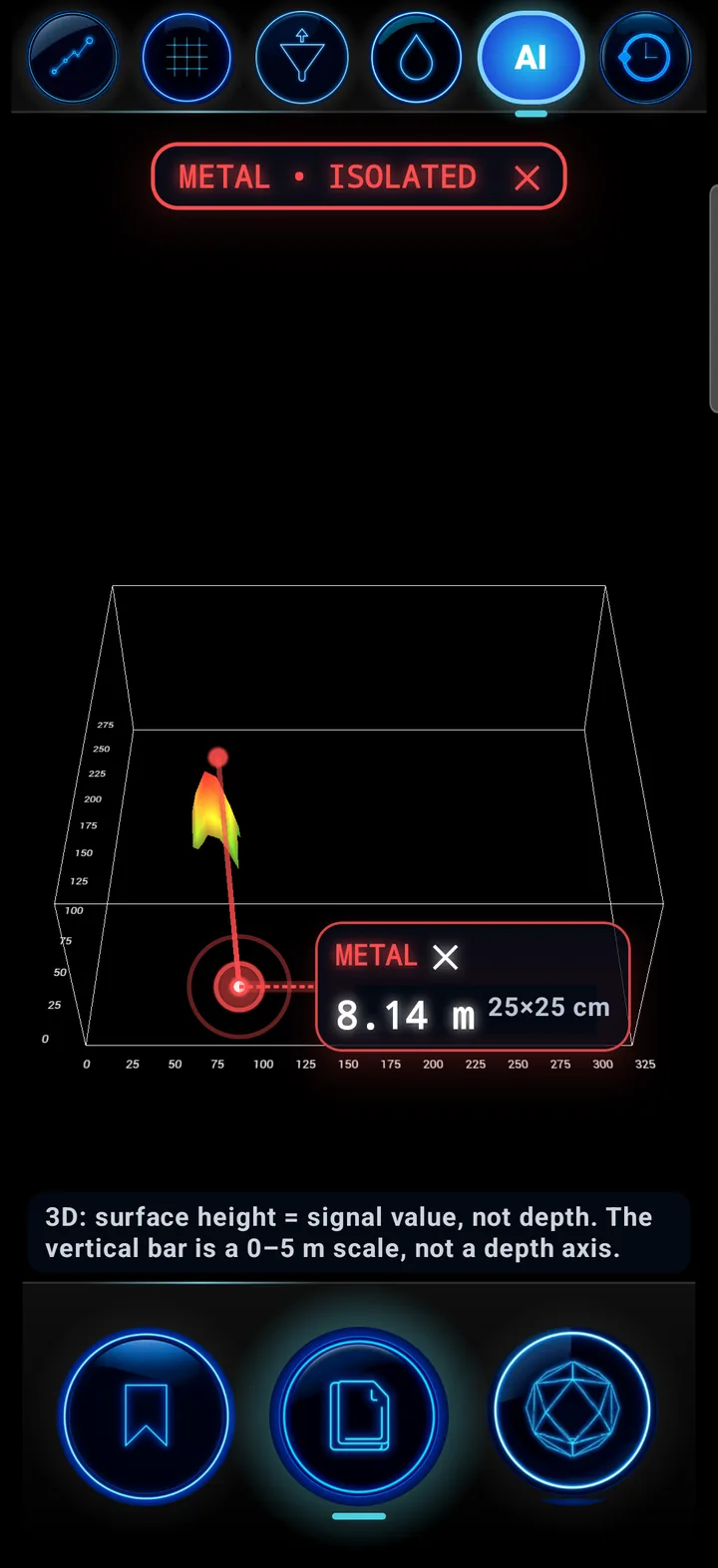
3D view with pin
09

3D view with pin

The finding is marked on the 3D surface with a depth callout.

  • Pin and callout beside the point.
  • Surface height is the signal value, not depth — stated on screen.
  • Isolate by category or show all.
3D FINDING PIN SIGNAL ≠ DEPTH
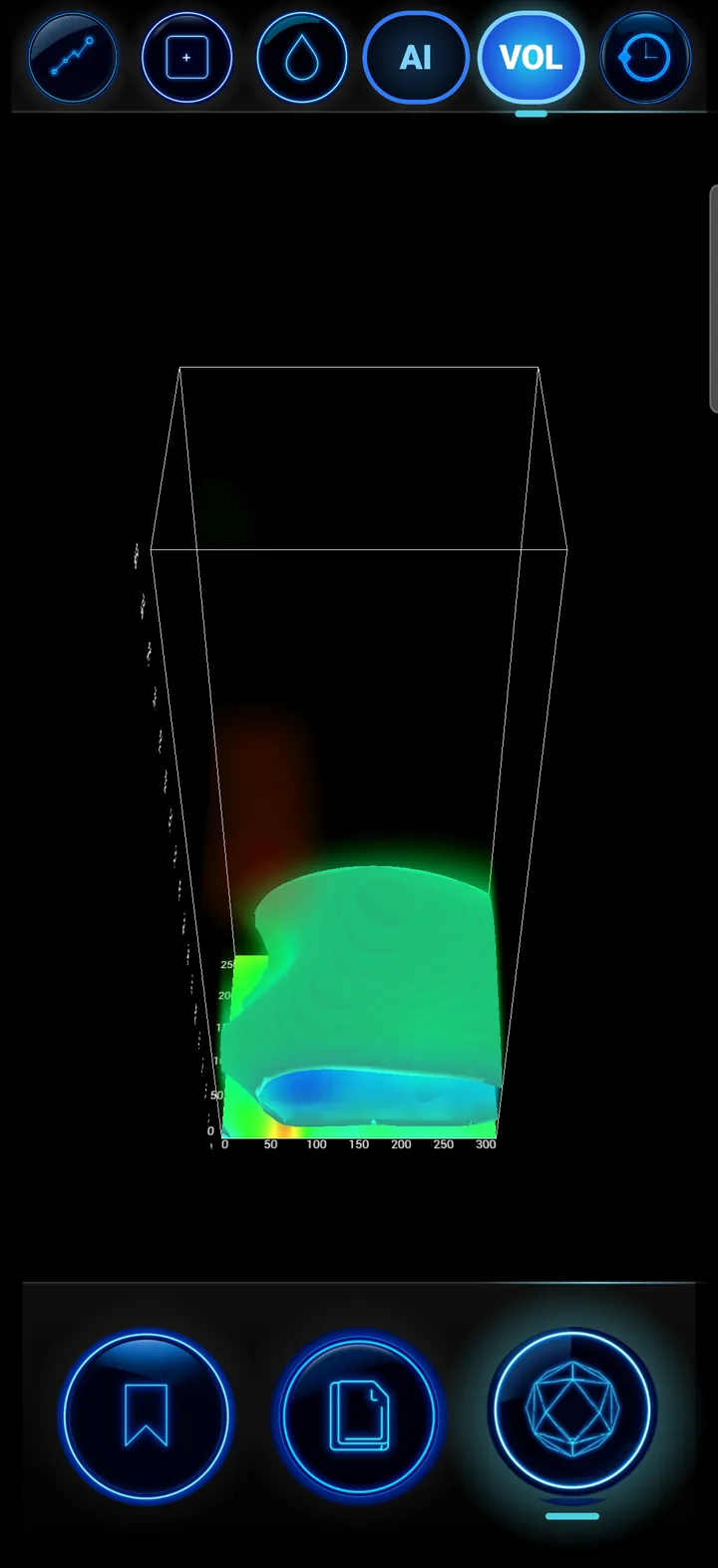
4D volumetric view
10

4D volumetric view

Volume from the real scan data, in a box with axes.

  • ISO, value and colour settings.
  • Finding boxes as a display convention.
  • Rotate and reset the view.
4D VOLUMETRIC
AI Chat
11

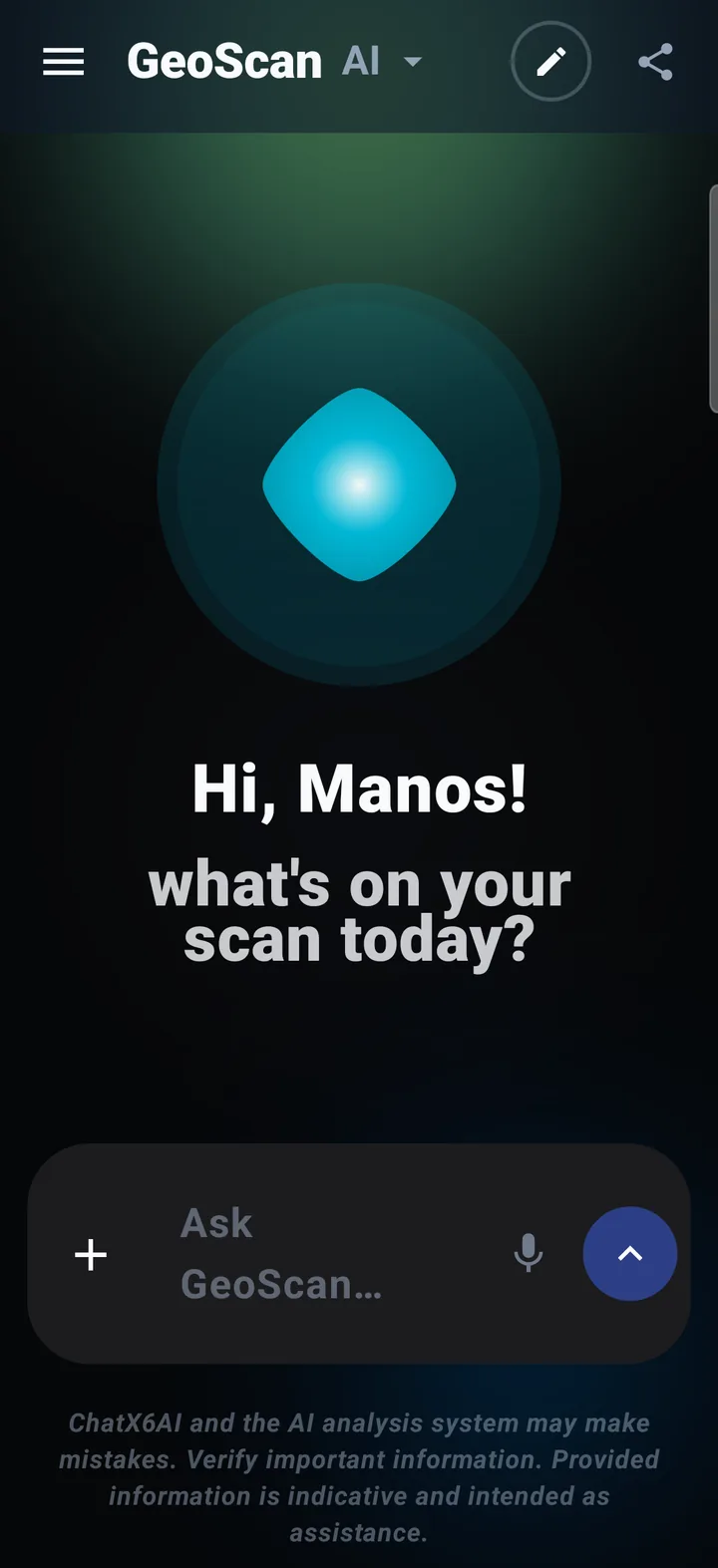
AI Chat

Talk with the AI assistant about your scan — by text or voice.

  • Attach scan files with “+”.
  • Voice questions with the microphone; answers can be read aloud.
  • New chat and chat history; PDF report in your language.
AI CHAT VOICE PDF
VOXEL 3D Visualizer
12

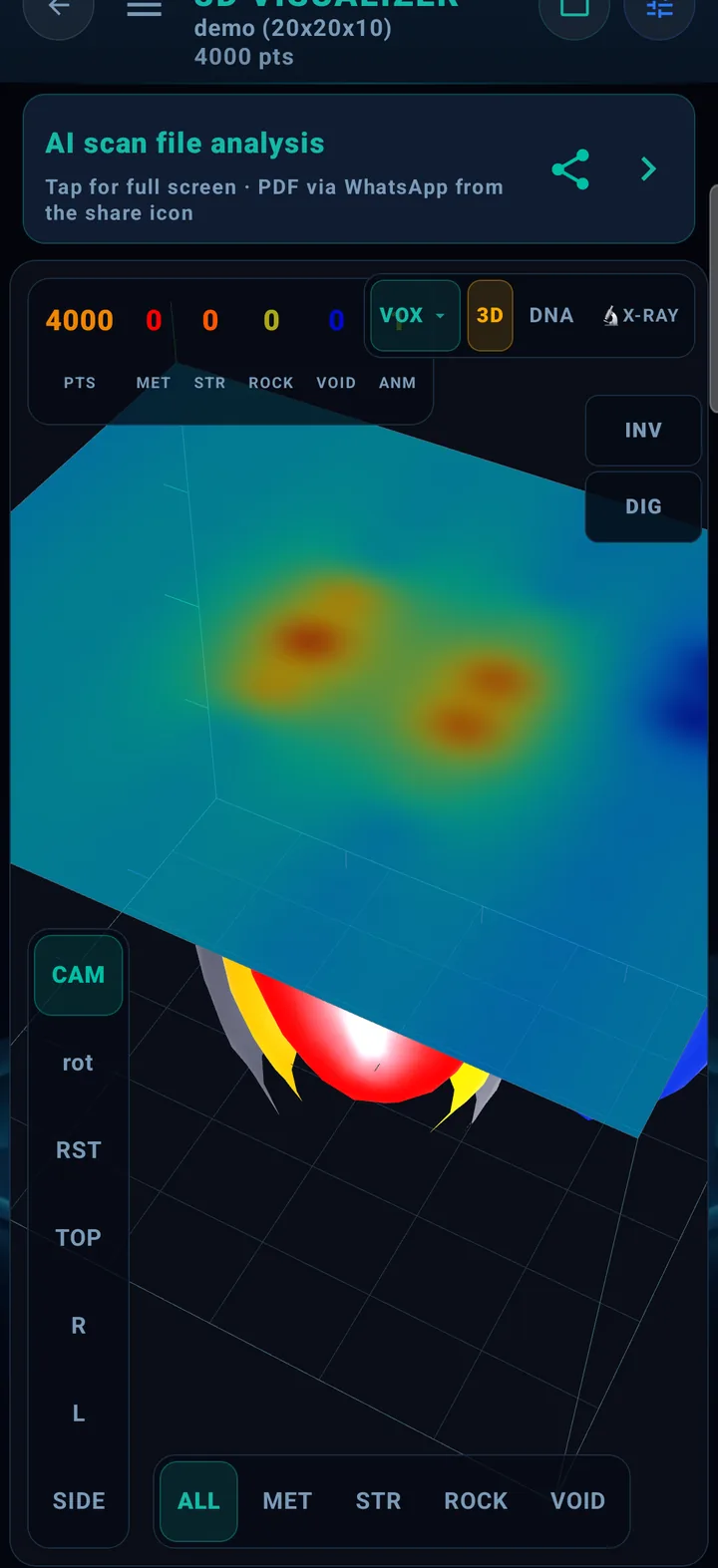
VOXEL 3D Visualizer

Volumetric 3D analysis of a scan file.

  • VOX, 3D, DNA and X-RAY views.
  • ALL / MET / STR / ROCK / VOID filters and per-category counters.
  • Camera, rotate, reset, top and side views; PDF via WhatsApp.
VOXEL 3D DNA X-RAY
X6 GEO-SAT — Satellite archaeology
13

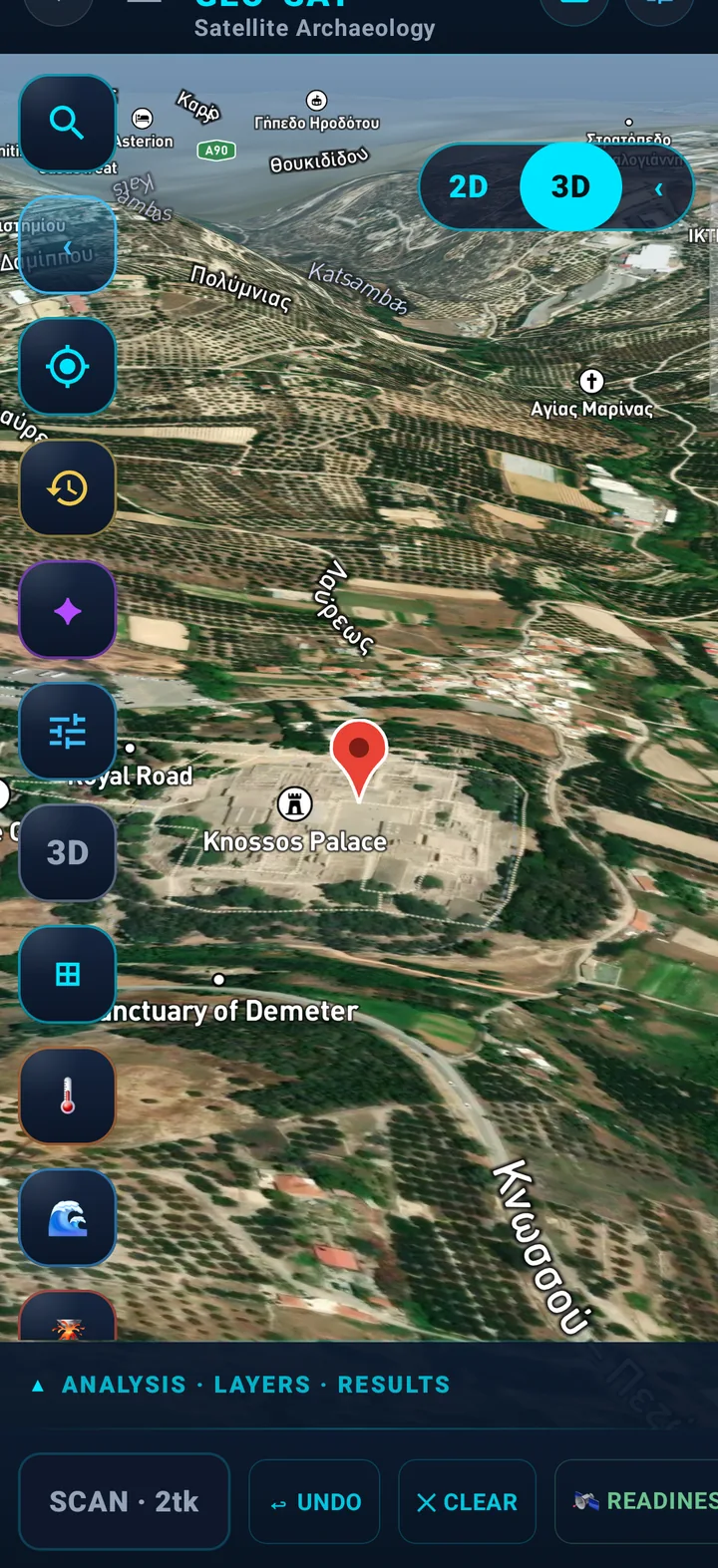
X6 GEO-SAT — Satellite archaeology

2D/3D satellite map to choose an analysis area (here: Knossos).

  • Search by DD · DMS · UTM · MGRS · GGRS87 coordinates.
  • Layers: thermal, bathymetry, SAR and analysis results.
  • Area scan charged in tokens — shown before it starts.
X6 GEO-SAT 2D · 3D SATELLITE
AENIGMA — Mark analysis
14

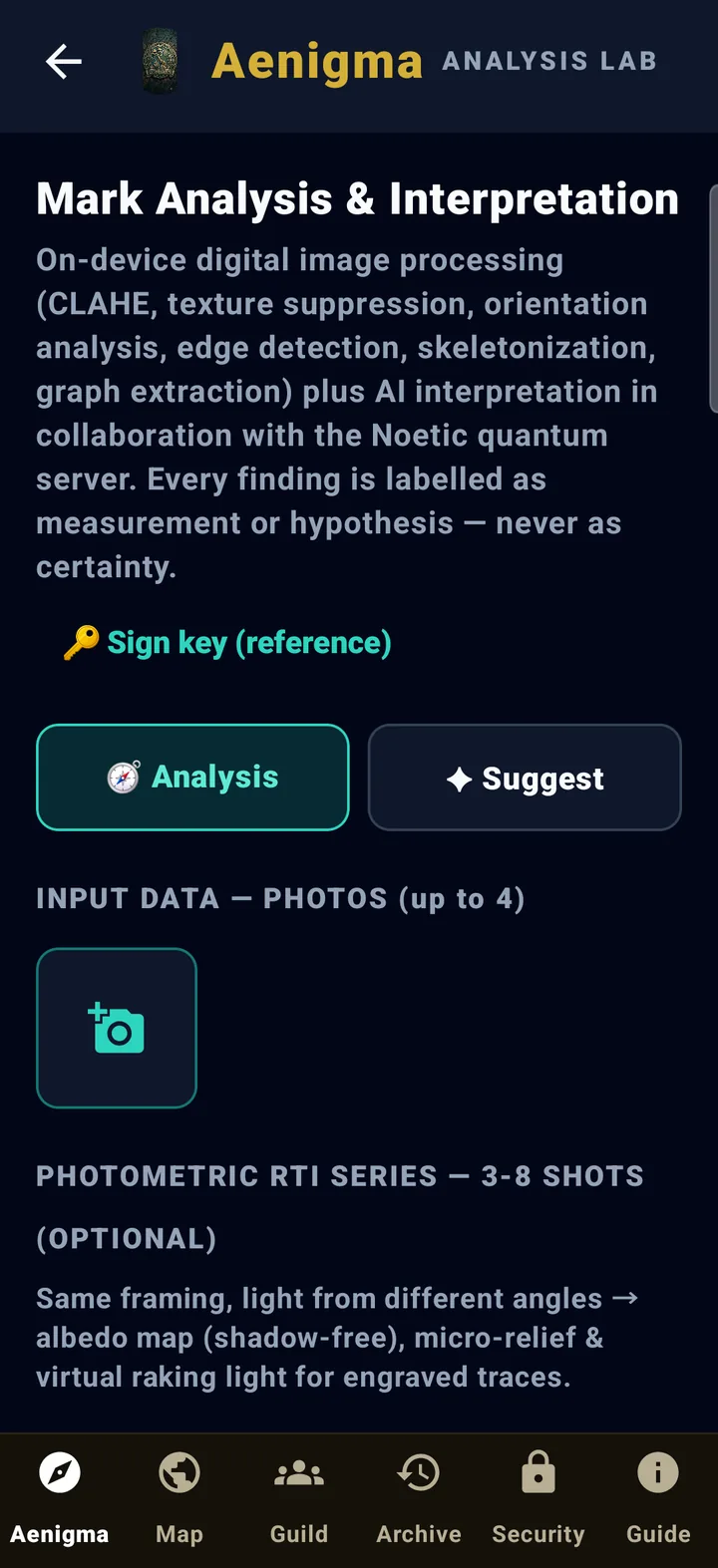
AENIGMA — Mark analysis

On-phone digital image processing and AI interpretation of carvings and symbols.

  • CLAHE, edge detection, skeletonisation and graph extraction.
  • Up to 4 photos plus an optional RTI series for micro-relief.
  • Every finding is labelled as measurement or hypothesis — never certainty.
AENIGMA IMAGE PROCESSING AI
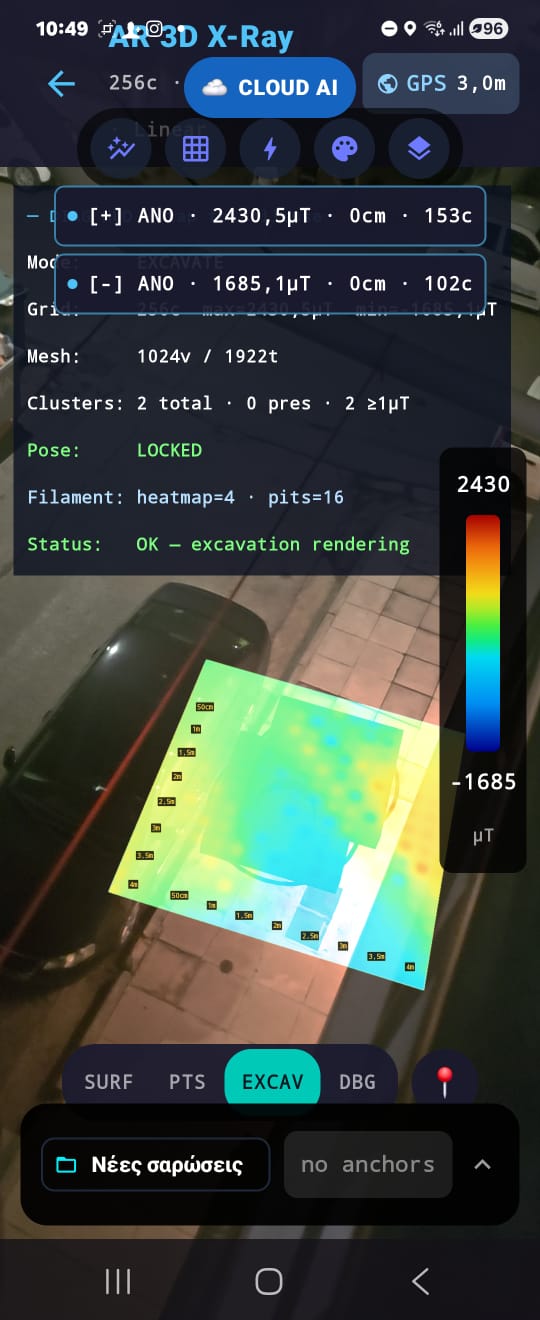
AR 3D X-RAY VPS · Heatmap IDW Fusion — See Below the Surface
15

AR 3D X-RAY VPS · Heatmap IDW Fusion — See Below the Surface

ARCore Geospatial VPS overlays a live isometric JET heatmap on the ground. Driven by X6 Plotter (X6 Geo Plus) data or phone sensor — your camera lens reveals underground magnetic composition via IDW fusion.

  • Sub-meter VPS accuracy — AR anchors locked to the map with no markers needed.
  • IDW heatmap overlay (9 interpolation methods): cold blue = low value, red = anomaly.
  • Depth from X6 Plotter (X6 Geo Plus) as primary · phone magnetometer as fallback — Kalman GPS + real-time depth rendering.
AR 3D X-RAY VPS · HEATMAP ARCORE GEOSPATIAL
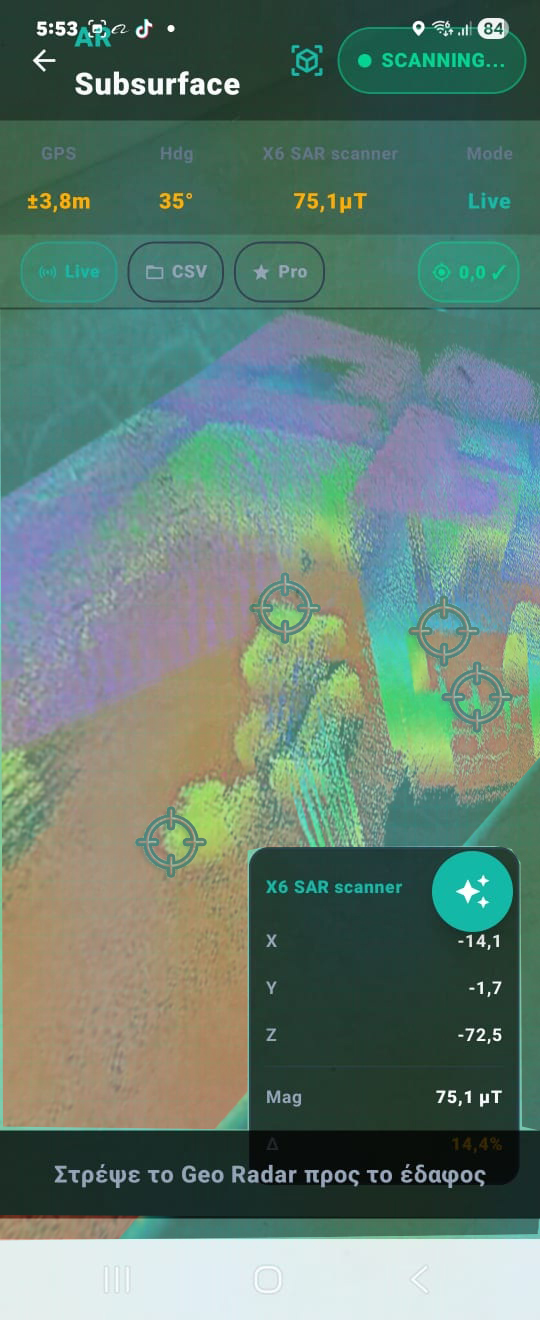
AR SAR Subsurface Scanner — Live
16

AR SAR Subsurface Scanner — Live

Live AR overlay of subsurface structure through the camera view. The lens becomes a window into the ground.

  • Live readings: GPS (±23.9m), Heading (295°), magnetic field (74.5μT).
  • Modes: Live · CSV export · Pro features · Set 0,0 calibration.
  • Data panel with X/Y/Z coordinates and real-time Δ change.
AR SAR LIVE BETA
Token Store
17

Token Store

Token packs inside the app and a referral programme.

  • GeoScan Basic 5 tokens · Pro 20 tokens · Gold 50 tokens.
  • Prices with and without VAT.
  • Invite & Earn: tokens for you and your friend with every activation.
TOKEN STORE BASIC · PRO · GOLD INVITE & EARN
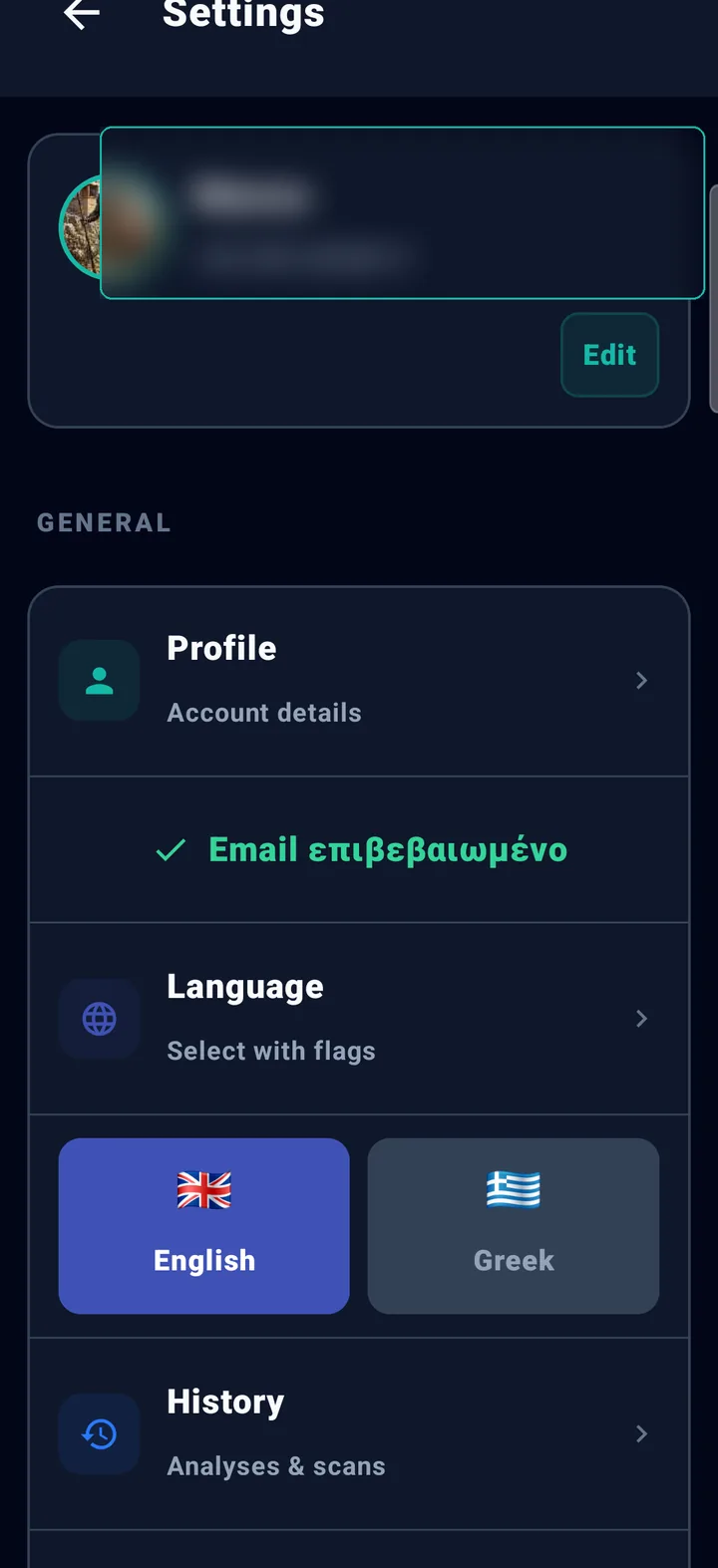
Settings & language
18

Settings & language

Profile, app language, history and instrument connection.

  • Greek or English — PDFs follow the language too.
  • History of analyses and scans.
  • Instrument & connection, NOETIC console and depth unit.
SETTINGS ΕΛ · EN
THE WHOLE APP · VERSION 2.4.119

Every feature at a glance

Every section users see in the app — the new ones and the established ones. Tap a card for its detailed page.

NEW

AI Scan

Grid scanning with the Ground Scanner, voice assistant, a beep per step and automatic analysis: metals, voids, possible structures, soil disturbance.

More →

AI Analysis · AI Chat

Send a scan and talk with the AI assistant; verdict, confidence, depth and a PDF report.

More →

Voice assistant

Long-press anywhere to ask by voice; in AI Chat the answers are read aloud.

More →

VOXEL 3D Visualizer

Volumetric 3D view with category filters, slicing, palettes and the DNA view.

More →

NOETIC Console

A live mirror of the gradiometer screen on the phone over Bluetooth.

More →

Live scan · Ground Scanner

Free walking with an oscilloscope, a σ bar and a 40 cm cell map. Detection only — no depth estimate.

AR 3D X-RAY

The scan map on the real ground, anchored to its coordinates with ARCore Geospatial.

More →
BETA

AR Scanner SAR

Augmented reality with live sensor readings through the camera.

More →
BETA

AETHER A.I. Scan

A liquid interpolated heat map with access to the AR functions.

DRONE SAR A.I.

Area planning and analysis through the map, with a training flight simulation.

More →

X6 GEO-SAT

Satellite archaeology: Sentinel-2, Landsat, SRTM, thermal, Sentinel-1 InSAR (surface deformation) and EMODnet/GEBCO bathymetry.

More →

AENIGMA

Decoding of symbols and maps with AI vision, together with the Fate mode.

More →

x6 Noetic

A multitool on the phone: NFC read/write, infrared remote, WiFi and BLE scanning, Flipper Zero companion.

Scans & History

Thumbnails, Classic 2D/3D/4D view, a PDF per scan and sending to AI Chat, VOXEL, AR or GEO-SAT.

Open files

CSV, XLSX/XLS, ODS, XML, JSON/GeoJSON, KML/KMZ, GPX and ZIP — also from other instruments.

PDFs in your language

Reports in Greek or English, as selected in the app.

Structure 3D

Draw a structure in three dimensions by hand for documentation — not from a scan.

Console update

From Settings; the first update of a new console requires a USB-C cable connection.

More →

Token Store

Token packs with secure in-app payment.

More →

Invite & Earn

5 tokens for every friend you invite who activates the app.

More →

Some features are available only in specific plans or are still in testing; the app shows this on the corresponding tile.

APP WORKFLOW

From raw file to actionable report

The production workflow used by field teams in ScanAnalyzer.

Import scan files

Load CSV/TXT/XML/JSON files from GPR, magnetometers, MT systems, or mixed sensor exports.

Run AI analysis

Multi-engine AI estimates depth, material class, confidence and anomaly type.

Visualize in 2D/3D/AR

Switch between heatmap, profile, voxel cube and tactical AR HUD for spatial validation.

Review and collaborate

Keep every run in history, compare sessions, and answer follow-up questions in Chat X6AI.

Export and share

Generate PDF reports and share through secure operational channels.

OPERATIONS & SUPPORT

Built for real-world field lifecycle

Not just scanning: full operational continuity before, during, and after mission execution.

Unified analysis history

Single timeline for AI chats, voxel analyses and scans with rename, delete, and grouped report export.

Support tickets with threaded replies

In-app ticketing with priorities, admin responses, and closed/open state tracking.

Redeem code onboarding

6-character redemption flow that applies profile fields and tier safely with upgrade-only rules.

Version and update visibility

Users can check new versions directly in app and keep mission devices aligned.

Training-base integration

Merge multiple CSV/TXT/XML files into normalized datasets ready for training pipelines.

DATA & COMPLIANCE

Security, consent and commercial control

Enterprise readiness for protected data and regulated operations.

Data ownership by design

Field files remain user-controlled and can be reviewed, renamed or deleted at any time.

Explicit consent gates

Terms and privacy acceptance are captured before activation and payment-critical actions.

Device activation lifecycle

License and token activation are tied to the device flow with clear state transitions.

Secure token commerce

Token packs and activation handled through secure checkout with server-side validation.

CAPABILITIES MATRIX

Which modules solve which mission

Practical mapping by vertical so teams can select the right workflow quickly.

Archaeology

Modules: STR/VOID filters, stratigraphy view, AI chat interpretation, PDF reports.

Outcome: Reduced exploratory excavation and higher confidence in target zoning.

Mining

Modules: MET/ROCK discrimination, geological sync, 3D voxel density analysis.

Outcome: Fewer false positives and better drilling prioritization.

Defense / Government

Modules: Tactical AR HUD, multi-node fusion, support workflows, activation controls.

Outcome: Faster deployment with stronger operational accountability.

Research / Academic

Modules: integration tools, reproducible exports, historical comparison, AI evidence factors.

Outcome: Better reproducibility and publication-ready evidence trails.

LIVE TACTICAL SIM

Try the Tactical AR HUD

Interactive simulation of the real app — Gun Scope reticle, Magnetic DNA Signature, 3-Phase State Machine.

X6 Subsurface 4D
0
● ΣΑΡΩΣΗ ● MOTION ⚫ MAN ΕΔΑΦΟΣ
GPS12sat · H1.20
RTKΕΠΙΒΕΒΑΙΩΘΗΚΕ 74%
ΔB+45.6 µT
MAG SONAR GPS SIG GPR-EXT AI
µT TRACE
∿ ΥΠΟΓΡΑΦΗ DNA — 0%
VOXEL 3D SIM

Explore the 3D Voxel Cube

Filter by material category (MET / VOID / ROCK / STR / ANM) — as in the real VOXEL 3D Visualizer.

AI ANALYSIS SIM

Multi-Agent Flow in Action

Watch AI Agents collaborate in real-time — physics, sonar, RF tomography, fusion engine.

📂 📂 Scan_2026-04-30_T01.csv → uploaded
⚛
Physics
µT + FWHM
〰
Sonar
Multi-echo
📡
RF Tomo
X-Ray Mode
🧠
Fusion
ToF Engine
T01 · Underground-Crypt 99%
[ΚΕΝΟ] · CAVITY_WAVEGUIDE
Depth
~3.76 m
ΔB
−42.6 µT
DNA
DIP/VOID
RF Att.
+5 dB
DETAILED CAPABILITIES

How the application works

From 50 Hz raw magnetometer signal to Euler-deconvolved depth, Noetic Multi AI classification and 3D voxel visualization — in under 10 seconds.

Core Capabilities

3D
PRO MAX

AETHER Voxel Tomography · 16×16×12 Grid

The AETHER engine converts raw 50 Hz magnetometer readings into a 16×16×12 voxel probability cube using IDW surface interpolation, vertical exponential decay exp(−depth/skinDepth) and Gaussian probability peaks (σ=0.6m per target). Non-maximum suppression identifies up to 3 isolated targets with minimum 3-cell separation.

  • Volumetric Analysis: Rotate the full 3D voxel cube on all axes. sliceAtDepth() extracts 2D cross-sections at any depth layer — from 0m to 3m+ targets. findTopTargets(k=3) returns the best-separated anomalies.
  • IDW + Gaussian Pipeline: Surface layer built from Inverse Distance Weighting of magnetometer samples, then vertical probability kernel applied per depth band. Cells with <3 samples excluded from final render.
  • OpenGL Rendering: Phong shading + Sci-Fi Fresnel halos on high-intensity cells. Magnetic particle effects on peaks. Drag = orbit, pinch = zoom. API 26+ compatible.
AI
PRO MAX

Noetic Multi AI Ensemble · Two-Tier Classification

Two-tier AI protection: (1) On-device Dudani (1976) distance-weighted K-NN on 10-feature Magnetic DNA vector — confidence hard-capped at 75%, ethical gate blocks TOMB/SACRED_SITE targets; (2) Noetic Multi AI Ensemble finalizes every verdict. Nothing reaches the screen without cloud verification.

  • Ground Calibration: 2D FFT high-pass filter (cutoff=0.18) removes mineralization baseline from raw grid. Athens reference: 48.2 μT ±0.3 μT. Soil auto-detected from SoilGrids API (clay%, CEC, pH, mineralization).
  • 9-Category Classification: Noetic Multi AI returns GOLD, SILVER, IRON, BRONZE, ALUMINUM, STONE, VOID, UNKNOWN, FALSE_POSITIVE — with full scientific reasoning in the user's language. Environmental modifiers: Open-Meteo weather, SoilGrids properties, Kp geomagnetic storm index.
  • Magnetic DNA Fingerprint: 10 spectral features extracted per scan (domFreq, entropy, kurtosis, meanRaw, peak-to-peak, FWHM, skewness, asymmetry, peak, sensorH) and sent to cloud for signature matching against verified excavation dataset.
DEPTH
MAX

Euler Deconvolution · Scientific Depth Engine

Industry-standard Euler deconvolution solves (x−x₀)·∂T/∂x + d·∂T/∂z = N·(−T) for structural index N=1 (contact/wall), N=2 (cylinder/pipe), N=3 (sphere/cache). Normal equations (AᵀA)u = Aᵀb solved at each candidate N — minimum RMS residual selects correct geometry.

  • 4-Method Hierarchy: EULER-RTK (cm-accuracy with RTK + ARCore VPS) > EULER-GRID (structured grid survey) > FWHM Half-Width Rule (z ≈ 0.6 × FWHM) > Magnetic Moment Inversion (r ≈ ∛(2M/Bz)). Each method displays its badge on the result card.
  • Soil Attenuation Correction: depth_corrected = depth_raw × exp(α × depth_raw). Calibrated per soil type: dry sand (α=0.005), limestone (α=0.008), concrete (α=0.012), wet clay (α=0.045). Auto-inferred from SoilGrids + camera surface classification.
GRID
PRO MAX

Grid Survey — Voxler 3D Heatmap

Professional geophysical mapping over a pre-defined grid. You set dimensions and step, walk cell-by-cell, and the app builds a real-time 3D Voxler-style heatmap of magnetic anomalies.

  • Cell-by-cell manual capture with amber 🎯 GROUND BALANCE on the first cell of each line — eliminates ground drift.
  • Vertex mesh with Z-score smoothing (σ=2.0), Phong shading, Sci-Fi Fresnel halos on strong cells, magnetic particles. Drag = orbit, pinch = zoom.
  • Tiered billing: 1 token ≤200m², 2 tokens ≤400m², 3 tokens ≤600m², 5 tokens ≤1000m², 1 token/200m² above. CSV to Downloads/X6 AI 4D/DATA/.
FREE
PRO MAX

Space Scan — Indoor Mapping (FREE)

Free local indoor mapping with passive WiFi RSSI scan + Bluetooth beacon listening + IMU dead-reckoning. Zero cloud calls, zero tokens. Works without GPS.

  • PDR (Pedestrian Dead Reckoning): magnetometer + accelerometer + gyroscope fusion. Step detection at 2 Hz, position update 1 Hz.
  • Auto anomaly pinning from AR Scanner findings + voice notes (long-press 🎤 for 30s recording → auto-transcription).
  • Multi-survey ICP merge + KDE treasure probability heatmap. Breadcrumb return arrow for quick exit. CSV export locally.
LIVE
PRO MAX

Real-Time Processing Tools (Live Mode)

Live streaming analysis during fieldwork, without waiting for post-processing.

  • Wireless Streaming: Data is transferred via Bluetooth directly to the application, allowing the user to see the analysis while walking the field.
  • Point-to-Point Analysis: Ability to focus on a specific point of the scan for further processing without needing a new acquisition.
EXPORT
PRO MAX

Data Export & Reports

Professional output for documentation, mapping and continuation of study in external tools.

  • Geo-Tagging: Linking measurements with GPS coordinates for precise localization on the map.
  • Export Formats: Ability to export analyses in file formats compatible with other geological programs for further study.
PRIVACY
PRO MAX

Data Ownership & Privacy

The company keeps no files on its servers — not even the survey areas. All data remains exclusively on your device.

  • Zero-server policy: zero storage of scans, GPS coordinates or reports on company servers.
  • Full control: revoke, rename or delete any analysis whenever you decide.
  • Local-only storage: all data stays on your device's internal storage.

From 50 Hz magnetometer → AGC-adjusted signal → 8×8 cell grid → Euler deconvolution depth → Noetic Multi AI classification → 16×16×12 voxel visualization. The complete scientific pipeline — the only field tool that combines geophysical rigor with cloud AI intelligence.

Online Integration

Real-Time Weather Integration

The application connects automatically to weather stations at the time of scanning, recording humidity, temperature and barometric pressure.

  • Atmospheric & Soil Humidity Levels Humidity directly affects soil conductivity and the propagation speed of radar waves. Recording it allows the AI to automatically calibrate the data for greater accuracy.
  • Temperature Helps analyze the thermal behavior of metals and voids, since temperature differences affect EMF sensor readings.
  • Barometric Pressure Important for detecting deep cavities, where pressure differences may indicate the presence of air or water.

Automatic Soil-Type Recognition (Geological Institute Sync)

Through online sync with international and local Geological Institutes, the application provides a full geological identity of the field.

  • Geological Mapping Automatically recognizes whether the soil is granite, limestone, clay or sandy, drawing data from official geological maps based on the GPS coordinates of the scan.
  • Penetration Adjustment (Dielectric Constant) The application «reads» the rock type and automatically adjusts the dielectric constant, letting the device know how easily or with how much difficulty the signal penetrates that specific ground.
  • Natural Mineral Flagging Notifies the user about the possible existence of natural deposits in the area, so they are not confused with the actual targets (e.g. iron veins or mineral-bearing rock).

Why these additions are critical

Error Reduction

The application «understands» the environment. If the ground is too wet due to recent rain, the software warns you or adjusts its filters.

Professional Reports

Every saved scan now includes a «Field ID» (Weather & Soil ID), which is essential for archaeological and professional geological studies.

Full Automation

The user does not need to enter the soil type manually. The application already knows it through the connection with the institutes.

🟦 Grid Survey

Professional Geophysical Mapping

Set dimensions + step — the app builds a 3D Voxler-style heatmap in real-time.

06:21 ΣΑΡΩΣΗ ΓΚΡΙΝΤ 📶 80%
14/25 cells
+8.4 ΔB
REC
-100+10 µT
+10 0 -10
14/25 · 491 samples · 0.8 m² · 300×300 cm
📌
ΓΩΝΙΑ
⊙
ΛΗΨΗ
✓
ΑΠΟΘ.
📡 STEP 1
Manual Capture · Z-Score Smoothing Tap CAPTURE in each cell, app filters EMI spikes with rolling 30-sample Z-score window (3σ threshold).
🎯 STEP 2
Per-Line Ground Balance Amber 🎯 on first cell of each line — calibration per row to eliminate drift from geomagnetic field.
🌐 STEP 3
X6 Multy Grounding Scanner system Primary Source 491 samples / scan with 0% CRC errors. When the X6 Multy Grounding Scanner system connects, phone magnetometer drops to auxiliary mode.
See Grid Survey page →
🥽 Augmented Reality

AR 3D X-RAY — See beneath the surface

ARCore Geospatial VPS + IDW heatmap fusion + Kalman GPS. Your phone's camera becomes a window into the subsurface, in real time.

← AR 3D X-RAY
VPS ✓ 0.3m
● 14/25
● R3C2
● 0.8T
● 28µT
● +125
● ±0.4m
X (cm) Y (cm) +125µT [h] GOLD · 88% · 95cm · 9c +125 -9 µT
SURF PTS EXCAV DBG
ARCore 1.46 ● LIVE SceneView 4.1
🛰 ARCore Geospatial VPS

Sub-meter accuracy without markers. AR anchors locked to the map — move the phone, the overlay stays exactly in position.

🌡 X-Ray Heatmap Overlay

IDW fusion with 9 interpolation methods. Deep cold blue = low value, hot red = high magnetic anomaly.

🧲 Depth from X6 Plotter · Geo Plus

X6 Plotter (X6 Geo Plus) or phone magnetometer as primary source. Real-time depth rendering without LiDAR — inverse physics modelling of the subsurface.

See AR 3D X-RAY page →
📡 X-Ray Mode

«See» through walls with passive WiFi

Your WiFi router becomes a passive RF source. RSSI variations reveal metal structures, wiring, pipes, and cavities.

06:21 📡 X-RAY MODE 📶 80%
📶 ROUTER · -42dBm PASSIVE RF
🔩 METAL PIPE 🕳 CAVITY ⚡ WIRE 🟫 BEAM SCAN
METAL
VOID
CONCRETE
WIRE
RSSI Δ -8.4dB · 7-VERDICT FUSION · 4 OBJECTS DETECTED
📶 PASSIVE RF SOURCE
WiFi Router as RF Source No transmitter needed. WiFi signal propagation provides 'illumination' for RF tomography — fully legal and passive.
🔩 7-VERDICT MATRIX
Mag + RF 7-Verdict Fusion Combines RSSI deltas with magnetometer for 7 verdicts: METAL, VOID, CONCRETE, WIRE, WATER, AIR, AMBIGUOUS.
🌐 SEE-THROUGH-WALLS
Through-Wall Visualization Crosshair scanner cursor shows live verdict + distance through wall. Perfect for utilities, archaeology, security.
See X-Ray Mode page →